Cowork Mode vs ChatGPT: Which Wins in 2026?
Side-by-side: file creation, scheduling, privacy, and pricing.
Read more →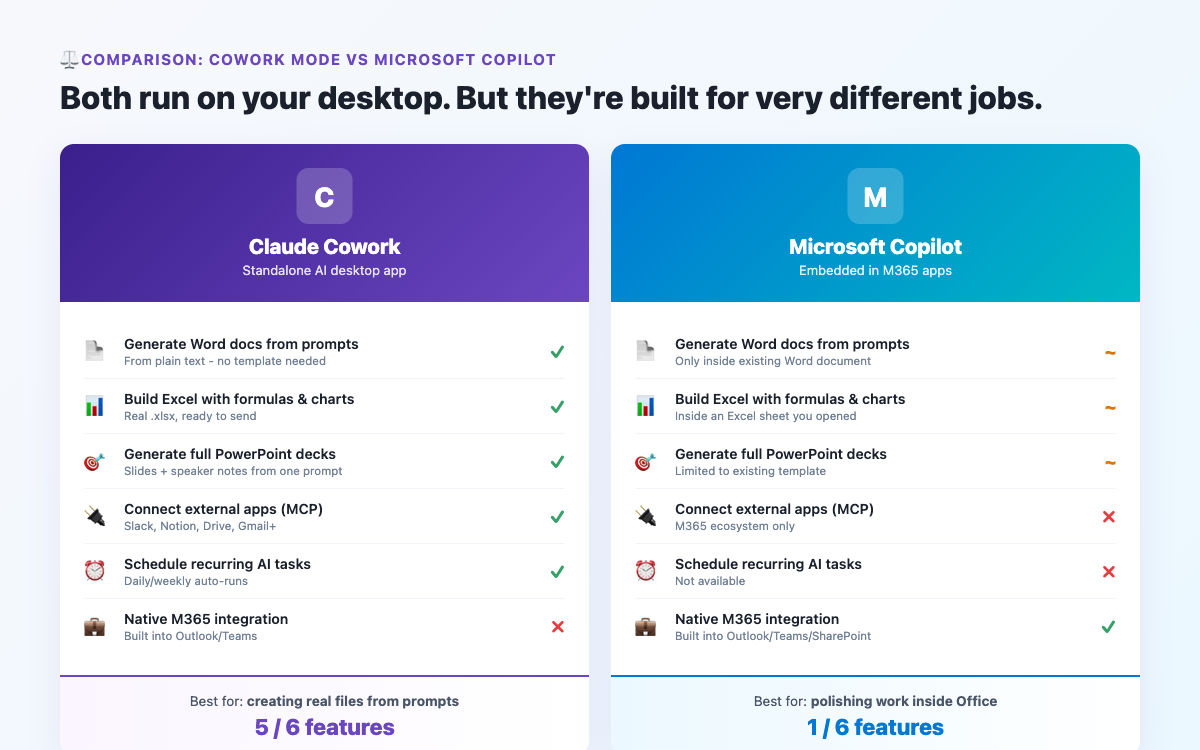
Microsoft Copilot and Claude Cowork mode are both AI assistants designed to help you get work done faster. They have genuine overlap - both can draft documents, summarise content, and assist with research. But they're built on different philosophies and serve different needs. If you're trying to decide between them, or wondering whether you need both, this comparison will give you a clear answer.
Microsoft Copilot is deeply integrated into the Microsoft 365 ecosystem. Its core strength is working within Office apps - drafting in Word, generating formulas in Excel, creating slides in PowerPoint, summarising threads in Teams. If your work is almost entirely within Microsoft tools, Copilot feels seamless. It's an AI layer on top of the software you're already using.
Claude Cowork mode works independently of any specific app ecosystem. It can work with Office files, PDFs, CSVs, code, and more - but its strength is intelligence and autonomy. You give it a task and it figures out how to complete it, rather than assisting as you work. It's an AI agent rather than an AI assistant.
| Category | Claude Cowork Mode | Microsoft Copilot |
|---|---|---|
| Works within Office apps | No - works alongside, not inside | Yes - native in Word, Excel, Teams, Outlook |
| Quality of writing/analysis | Excellent - Claude is among the best models for writing | Good - GPT-4 based, solid but less nuanced |
| Autonomous task completion | Strong - runs multi-step tasks end to end | Limited - primarily assists within a single app |
| Works with local files | Yes - full access to your workspace folder | Via OneDrive/SharePoint, less flexible with local files |
| Scheduled/automated tasks | Yes - run recurring tasks automatically | No |
| App integrations (MCP) | Growing - 38+ via MCP connectors | Deep Microsoft 365 integration (Teams, Outlook, SharePoint) |
| Setup required | Workspace folder + optional Skill file | Just log in if you have M365 - embedded in apps |
| Cost | ~$20/month (Claude Pro) | $30/user/month (Copilot for Microsoft 365) |
| Excel formula help | Can write and run formulas via Python | Native - suggests formulas directly in cells |
| Teams/meeting summaries | Not without connector setup | Automatic meeting transcription and summaries |
| Non-Microsoft file formats | Handles almost anything | Primarily focused on Microsoft formats |
| Custom workflows/Skills | Yes - build your own Skills and automation | Limited customisation |
If your team lives in Microsoft 365, Copilot's native integration is hard to beat for specific tasks. It can: summarise an entire Teams meeting transcript the moment it ends, suggest email replies directly in Outlook, draft a document while you're in Word with access to your other M365 files, and create slide structures in PowerPoint from a brief. These are low-friction, high-value integrations that Cowork mode doesn't replicate without additional setup.
For enterprises already paying for Microsoft 365 at scale, Copilot can be included in existing agreements at relatively low marginal cost.
For intelligence, autonomy, and writing quality, Claude is ahead. Cowork mode can: take a vague instruction and figure out how to execute it without step-by-step guidance, work across file types without needing them in a specific cloud location, build recurring automated tasks, produce significantly better long-form writing and analysis, handle non-Microsoft workflows, and be customised through Skills to match your specific processes. It also costs less as a standalone subscription.
For anyone who doesn't work exclusively in Microsoft tools - or who wants an AI that can do things without being inside a specific app - Cowork mode offers more flexibility and often better results.
Yes - and for Microsoft-heavy organisations, the combination makes sense. Copilot handles in-app assistance within Office tools while Cowork handles the bigger, more complex tasks that require actual autonomy: researching and producing a report, processing batches of files, running scheduled automations, building analysis from multiple data sources. They occupy different parts of the workflow rather than competing directly.
For raw intelligence, writing quality, and autonomous task completion: Claude Cowork mode is better, and cheaper.
For native Microsoft 365 integration and meeting summaries: Copilot is the right tool.
For most individuals and non-enterprise teams: Start with Claude Cowork. For large enterprises already on M365 who want deep integration: Copilot is worth having. If budget allows, both complement each other well.
Curious how Cowork compares to other tools? See Cowork vs ChatGPT and Cowork vs Zapier for more comparisons.
Co-Founder of BrandStori.AI with 25+ years of experience in the IT industry. Also the creator of @ottasia/mcp-server - an MCP server with 500+ npm downloads, listed in the official MCP Registry. A daily user of Claude's Cowork mode - every guide on this site is personally tested before publication, so you can trust what you read here.
Hand-picked guides covering related topics.
Side-by-side: file creation, scheduling, privacy, and pricing.
Read more →Get tips, updates & comparisons on Claude's Cowork mode.
Get weekly tips & updates.