Cowork Mode vs ChatGPT: Which Wins in 2026?
Side-by-side: file creation, scheduling, privacy, and pricing.
Read more →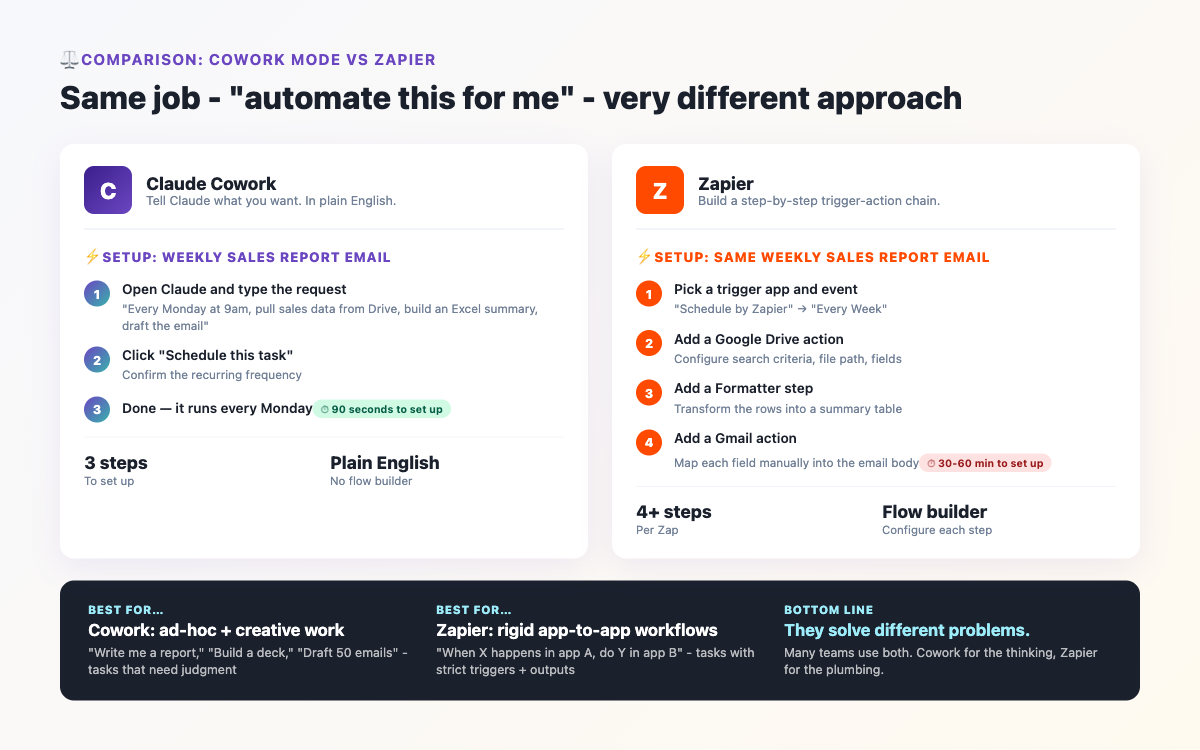
When someone tells you "just automate it," they usually mean one of two things: set up a Zapier workflow, or ask Claude to do it. In 2026, both are genuinely good options - but they work in completely different ways and shine in completely different situations. If you're trying to decide which to invest time in, this comparison will give you a clear answer.
Before getting into specifics, it's worth understanding what each tool actually is at its core - because they're solving different problems.
Zapier is a rule-based automation platform. You define triggers and actions: "When X happens, do Y." It's deterministic - the same input always produces the same output. It connects apps via APIs and runs in the cloud without you needing to be involved. It's been doing this reliably since 2011.
Claude Cowork mode is an intelligence-based assistant. You describe what you want to achieve, and Claude figures out how to get there. It can handle ambiguity, read context, make judgement calls, and adapt when things don't go to plan. It works on your desktop with access to your actual files and can use real tools - not just API connections.
| Category | Zapier | Claude Cowork |
|---|---|---|
| Setup complexity | Low - visual drag-and-drop builder, no code needed | Very low - describe in plain English, no builder needed |
| Cost | $20–$800+/month depending on task volume | ~$20/month (Claude Pro covers all Cowork usage) |
| Handles messy/variable input | Poor - breaks when data format changes | Excellent - reads context and adapts |
| Works with local files | No - cloud apps only | Yes - full access to files on your computer |
| Runs without you present | Yes - fully automated in background | Yes with scheduled tasks - but newer feature |
| Document creation/editing | Very limited | Excellent - Word, Excel, PDF, PowerPoint |
| App integrations | 6,000+ apps natively | Growing via MCP connectors - fewer but expanding |
| Handles one-off complex tasks | Not really - requires setup for each new task | Excellent - great for ad-hoc complex work |
| Reliability for simple repeating tasks | Very high - runs 24/7 without thinking | Good but AI adds slight variability |
| Writing & content creation | Cannot create original content | Excellent - drafts, edits, summarises |
| Learning curve | Moderate - need to understand triggers/actions/filters | Very low - conversational |
| Error handling | Fails silently or sends error emails | Explains what went wrong and suggests fixes |
Zapier is genuinely excellent for high-volume, predictable, app-to-app workflows. If you need 500 form submissions per month automatically added to a CRM and then trigger a personalised email sequence - Zapier handles that flawlessly, every time, without you being involved. It has been refined for over a decade specifically for this use case.
If your automation is: "When event A happens in App X, immediately do action B in App Y, then action C in App Z" - and this happens reliably, repeatedly, with consistent data - Zapier is the right tool. It's faster to set up for simple linear workflows and more reliable for high-frequency tasks.
Cowork mode dominates when the task involves intelligence, not just data transfer. The moment you need something read, understood, rewritten, reformatted based on context, or decided upon - Cowork is in a different league entirely.
Here's a concrete example. Suppose you receive invoices from 10 different suppliers, all in different formats - some PDFs, some Word docs, some Excel files. You need to extract the totals, categorise them, and update your accounts spreadsheet. In Zapier, this is nearly impossible without custom code for every format. In Cowork mode, you say: "Process all the invoices in this folder, extract the amounts and supplier names regardless of format, and update the accounts tracker." Claude handles the variability automatically.
Another area where Cowork is unmatched: document work. Zapier cannot write a proposal, draft a performance review, create a PowerPoint deck, or produce an analysis report. Cowork does all of these in minutes, with context you provide once.
This is where things get interesting. Zapier's pricing scales with usage - the free plan is very limited (100 tasks/month), and serious usage quickly pushes you to $50–$100+/month. Complex multi-step workflows ("Premium Zaps") cost more. Many businesses spend $200–$500/month on Zapier alone.
Claude Cowork mode is included in Claude Pro at around $20/month. That covers unlimited Cowork sessions, file access, document creation, web research, and scheduled tasks. For individuals and small teams, the cost advantage of Cowork is significant.
The caveat: if you're running thousands of automated triggers per day (e-commerce order processing, high-volume CRM syncs), Zapier's per-task model is built for that scale. Claude isn't designed to replace that kind of infrastructure automation.
Absolutely - and the best setups often do. A smart combination looks like this: use Zapier for the data plumbing (moving information between apps automatically) and Claude Cowork for the thinking and document work (turning that data into something useful). For example: Zapier collects new customer feedback from a form and saves it to Google Sheets. Once a week, Claude Cowork reads that sheet, analyses the themes, and writes a structured insights report saved to your documents folder. Neither tool alone does this as well as the two together.
Choose Zapier if your primary need is connecting cloud apps automatically at scale, with consistent predictable data, running in the background without your involvement.
Choose Claude Cowork if your work involves files on your computer, document creation, variable or messy data that needs intelligence to process, or one-off complex tasks you'd otherwise do manually.
Use both if you want the best of both worlds - automated data collection with intelligent processing on top.
For most individuals and small teams in 2026, starting with Claude Cowork mode and adding Zapier for specific integrations later is the most cost-effective path.
If you've decided to explore Claude Cowork mode, the learning curve is genuinely minimal. Check out our Getting Started guide for a full walkthrough, or browse the Community Q&A where hundreds of users share their real-world automation experiences. If you have a specific task you're trying to automate, chances are someone in the community has already figured it out.
Co-Founder of BrandStori.AI with 25+ years of experience in the IT industry. Also the creator of @ottasia/mcp-server - an MCP server with 500+ npm downloads, listed in the official MCP Registry. A daily user of Claude's Cowork mode - every guide on this site is personally tested before publication, so you can trust what you read here.
Hand-picked guides covering related topics.
Side-by-side: file creation, scheduling, privacy, and pricing.
Read more →Set Claude to run daily, weekly, or one-off jobs on its own.
Read more →Get tips, updates & community insights on Claude's Cowork mode - straight to your inbox.
Get weekly tips, Q&A highlights & Cowork mode updates.