Cowork Mode vs Microsoft Copilot
Cowork creates files. Copilot polishes them.
Read more →A 2026 head-to-head - features, pricing, privacy, and which one actually saves you more time.
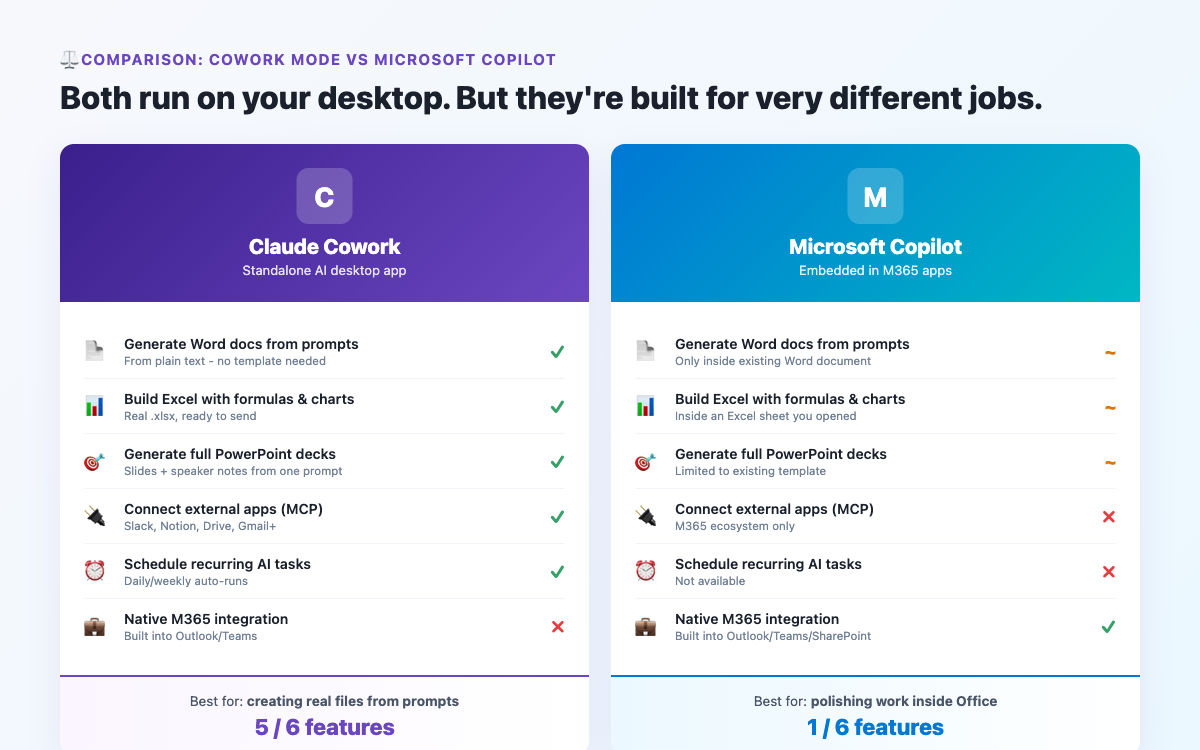
Both Claude Cowork mode and Microsoft Copilot aim to make you more productive at work using AI. But they take very different approaches - and the right choice depends heavily on what tools you already use and what you actually need AI to do. This comparison breaks down the key differences honestly and without hype.
Microsoft Copilot is an AI assistant built directly into Microsoft 365 products - Word, Excel, PowerPoint, Outlook, and Teams. It uses GPT-4 (via Microsoft’s partnership with OpenAI) and is deeply embedded in the Microsoft ecosystem. You can add it to an existing Microsoft 365 subscription for an additional monthly fee per user.
Copilot’s strength is its tight integration with Microsoft apps. Highlight text in Word and ask Copilot to rewrite it. Ask it to summarise a Teams meeting automatically. It lives inside the apps you already use, invisibly, like a built-in assistant.
Claude Cowork mode is a feature of the Claude desktop application by Anthropic. It runs as a standalone app alongside all your other tools, can interact with files on your computer, browse the web, create documents and spreadsheets, and connect to third-party apps via MCP connectors. It works across your entire workflow, not just within one ecosystem.
| Feature | Claude Cowork Mode | Microsoft Copilot |
|---|---|---|
| AI Model | Claude (Anthropic) | GPT-4 (OpenAI / Microsoft) |
| Pricing | ~$20/month (Claude Pro) | ~$30/user/month (+ M365 cost) |
| Requires Microsoft 365 | No | Yes |
| Creates Word / Excel / PPT | Yes (as standalone files) | Yes (within Office apps) |
| Web research | Yes | Yes (Bing) |
| Scheduled tasks | Yes | No |
| App integrations | MCP connectors (Slack, Notion, HubSpot...) | Microsoft 365 only |
| Local processing | Yes | No (cloud-based) |
| Teams meeting summaries | No | Yes |
Works without Microsoft 365. If you use Google Workspace, Notion, or other non-Microsoft tools, Cowork mode fits naturally. Copilot requires an active Microsoft 365 subscription and is limited to that ecosystem.
Scheduled automation. Cowork mode has a built-in task scheduler for recurring automations - daily briefings, weekly reports, monthly summaries. Copilot has no equivalent.
Broader app integrations. MCP connectors extend Claude to Slack, Notion, Asana, HubSpot, GitHub, and many more. Copilot is tied to Microsoft 365.
More affordable. Claude Pro is ~$20/month. Copilot M365 is ~$30/user/month on top of your existing M365 subscription - significantly more expensive for small teams.
Privacy. Cowork mode runs locally on your computer. Copilot is cloud-based, meaning your documents pass through Microsoft’s servers when Copilot processes them.
Inline Office integration. If your entire workflow lives in Word, Excel, and Teams, Copilot’s seamless inline assistance is genuinely excellent. Highlighting a paragraph and clicking "Rewrite" is frictionless in a way a separate app cannot fully match.
Teams meeting summaries. Copilot can automatically transcribe and summarise Microsoft Teams meetings - a real time-saver for organisations using Teams heavily.
Enterprise compliance. For large organisations, Copilot has more mature admin controls and compliance certifications built in.
Choose Claude Cowork mode if you want a powerful AI that works across your entire workflow regardless of which apps you use, you value privacy and local processing, you want scheduled automation, you are not deeply embedded in Microsoft, or you want the more affordable option.
Choose Microsoft Copilot if your entire workflow is in Microsoft 365, you want inline AI that feels invisible inside Word/Excel/Teams, or you are in an enterprise with specific Microsoft compliance requirements.
Consider using both: Many professionals use Copilot for inline Office editing and Cowork mode for broader research, automation, and cross-app tasks. They complement each other.
Claude offers a free tier through the desktop app. Install it and try Cowork mode on a real task before committing. See the Getting Started guide to set up in under 10 minutes.
Join the community for insights, updates and practical how-tos.