MCP Connectors Explained (Slack, Notion, Drive+)
Connect your apps to Claude so it can act across them.
Read more →What they are, how they work, and how to use them to get dramatically better results from Cowork mode.
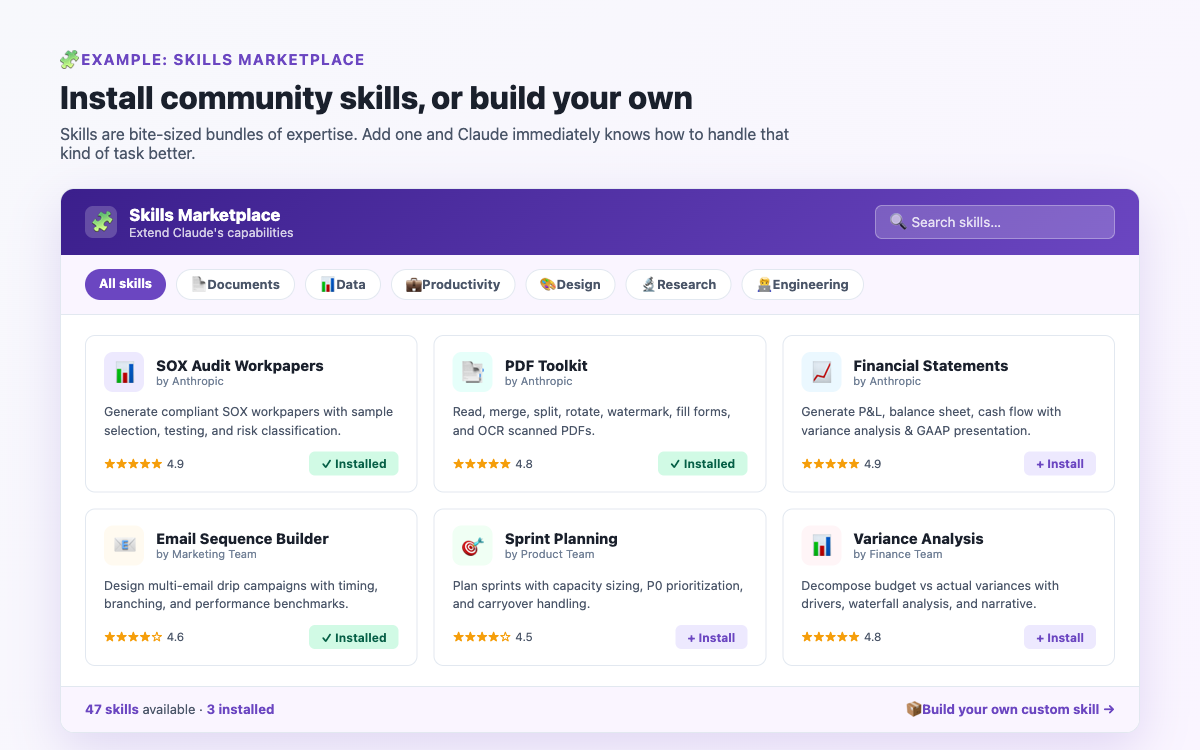
Out of the box, Claude Cowork mode is a capable generalist assistant. But when you add Skills, it becomes a specialist. A Sales skill teaches Claude the best practices for sales outreach. A Finance skill enables professional-grade financial analysis. A Marketing skill gives Claude deep knowledge of campaign planning and copywriting. Skills are the difference between a good general assistant and an expert in your field.
Skills are curated sets of instructions and best practices built into Cowork mode that guide Claude when performing specific types of tasks. Think of a Skill as a detailed briefing document that Claude reads before tackling a task - one that encodes the knowledge of an expert in that domain.
For example, a "Word Document" skill tells Claude exactly how to structure professional Word documents - correct heading hierarchy, table of contents formatting, page number placement, and so on. A "Sales Outreach" skill tells Claude how to research prospects, what makes a compelling first email, and how to personalise messages effectively.
Skills do not change what Claude can do - they change how well it does specific tasks by giving it domain-specific guidance that has been refined over many iterations.
Plugins are bundles that package together Skills, MCP connectors, and settings for a specific use case or profession. Instead of installing individual Skills and connectors one by one, a Plugin gives you everything you need for a particular workflow in one install.
For example:
Plugins are installed from the Cowork plugin marketplace and are available from Anthropic and third-party developers.
Step 1: In Claude Cowork mode, you can invoke any available skill by typing a slash command (e.g. /docx to activate the Word document skill) or by simply asking Claude to use a skill.
Step 2: You can browse available skills from within Cowork mode by asking Claude "what skills do I have available?" - it will list the skills installed in your setup.
Step 3: For Plugins, open Claude desktop app Settings → Plugins, where you can browse and install from the available marketplace.
Cowork mode comes with a set of built-in core skills covering the most common productivity tasks:
| Skill | What It Does |
|---|---|
| docx | Creates professional Word documents with correct formatting, headings, tables, and structure. |
| xlsx | Builds Excel spreadsheets with working formulas, charts, conditional formatting, and multiple sheets. |
| pptx | Creates professional PowerPoint presentations with proper slide structure and speaker notes. |
| Handles PDF creation, extraction, and manipulation tasks. | |
| schedule | Creates and manages scheduled automated tasks. |
| lead-magnets | Plans and optimises lead magnets for email capture and content marketing. |
Skills are invoked either automatically (Claude detects the task type and applies the relevant skill) or manually by using a slash command. For example:
/docx Create a professional report on our Q1 marketing results. Include an executive summary, campaign performance breakdown, budget vs actuals table, and recommendations for Q2. Audience: senior management. Save as "Q1-Marketing-Report.docx".
The /docx prefix signals to Cowork mode to apply the Word document skill, ensuring the output follows the best practices for professional .docx creation rather than just producing formatted text.
Depending on your role, some of the most impactful plugins to look for include:
For Sales professionals: A sales plugin typically includes skills for account research, outreach writing, call preparation, pipeline review, and competitive intelligence.
For Marketing teams: Includes skills for content creation, campaign planning, brand review, SEO audits, and performance reporting.
For Developers and Engineers: Includes skills for code review, architecture decisions, incident response, documentation writing, and technical debt tracking.
For Finance teams: Includes skills for journal entry preparation, reconciliation, variance analysis, and audit support.
For Product Managers: Includes skills for writing specs, sprint planning, roadmap updates, stakeholder updates, and research synthesis.
To understand why skills make such a difference, consider the difference between asking a generalist to write a financial variance analysis versus asking a qualified accountant. Both can attempt it. But the accountant knows the standard format, the terminology, the typical structure, and the things a CFO will want to see. A Skill essentially teaches Claude to think like that expert for the duration of the task.
Without the Finance skill: Claude will write a variance analysis in a reasonable but generic format.
With the Finance skill: Claude follows the professional conventions for variance analysis - period-over-period structure, driver decomposition, narrative commentary in the right register, and all the elements that a finance professional expects.
In any Cowork mode conversation, simply type "what skills do I have?" and Claude will list the skills and plugins currently available in your setup. For a full overview of Cowork mode’s features, visit the Features page, or see the Tips & Tricks section for practical examples of skills in action.
Join the community for insights, updates and practical how-tos.